How to create a translation glossary, with a CSV template
Start with the words your team cannot afford to get wrong. Give each one a meaning, a language pair and an owner, then check that the translation workflow actually receives those decisions.
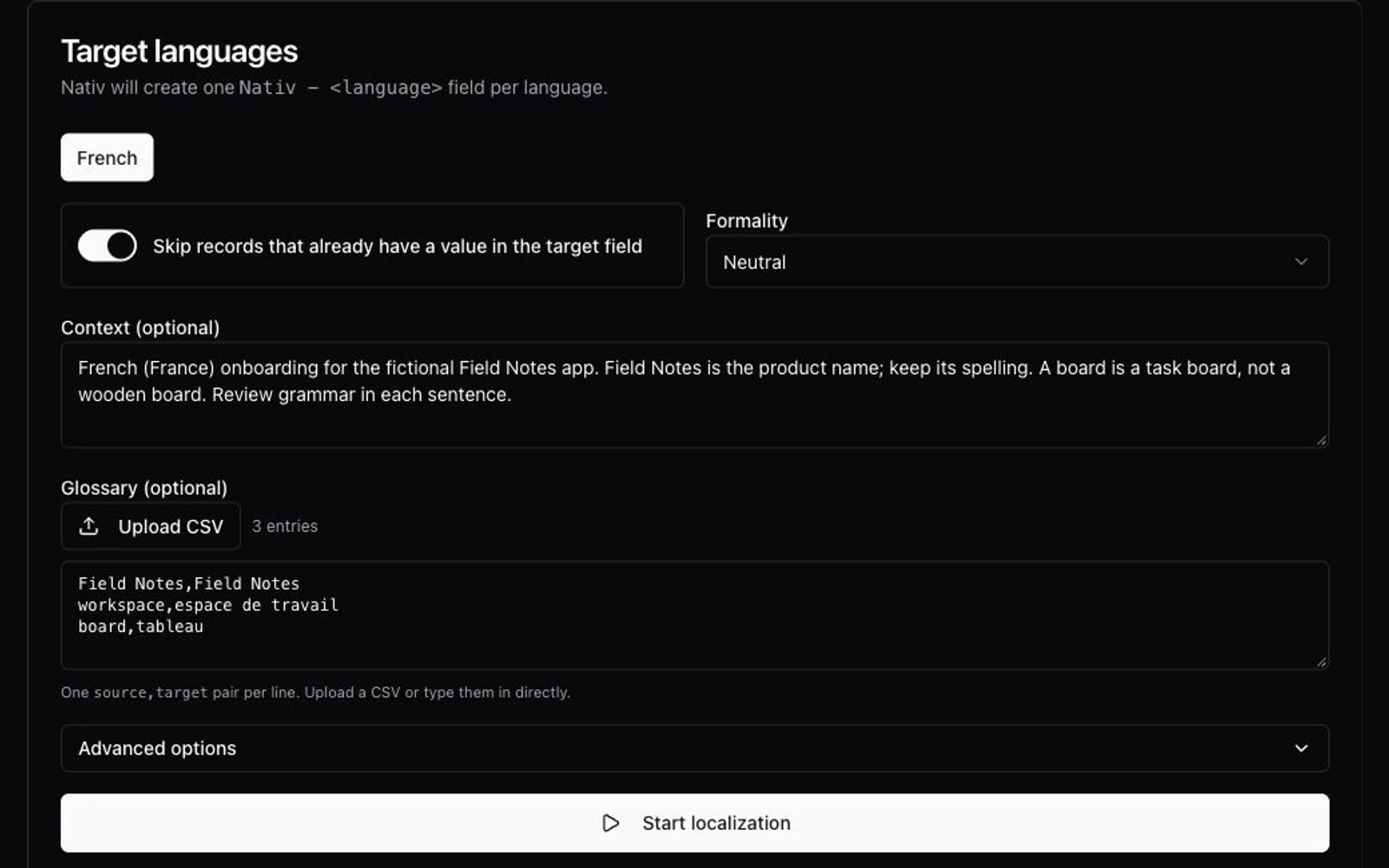
To create a translation glossary, collect recurring product terms, define what each means, agree on its treatment for a specific locale, and record who approved it. Keep that editorial worksheet, then export the fields your translation tool accepts. Test a small set of real sentences before applying the glossary to a whole campaign.
You can start in a spreadsheet. The harder part is deciding whether “board” means a task board, a piece of wood or a group of directors, and making sure the right decision reaches the request.
That practical problem appears in a translator’s question about organising specialised glossaries: replies describe spreadsheets, project boundaries and context fields. In an RWS support discussion, a user had a termbase but could not see its terms reflected in machine translation. A glossary can exist without being connected to the translation path.
This guide is written by Nativ. We checked the current dashboard and public MCP interfaces on 1 November 2026. The screenshot uses actual product components with fictional settings; the downloadable French terms are manually supplied draft examples. We did not run an AI translation or a language-quality comparison for this article.
Decide what belongs in the glossary
Start with material your team already uses: interface labels, campaign copy, a product explainer and reviewed language versions. Select terms whose interpretation affects the work: product names, specialist concepts, recurring actions and wording that has caused disagreement.
Keep complete approved messages in translation memory. Keep tone and writing preferences in the style brief. The glossary gives a shorter term its intended meaning and treatment. Microsoft’s globalization reference describes translation memory as reusable source/target translation units; copying an entire memory into a term list does not identify the important terminology for you.
For a fictional planning app called Field Notes, a starting glossary could look like this:
| Source term | Draft French treatment | Meaning and boundary |
|---|---|---|
| Field Notes | Field Notes | Product name. Preserve its spelling and capitals when naming the app. Ordinary “field notes” are outside this rule. |
| workspace | espace de travail | The shared container for projects. Review its grammar in each sentence. |
| board | tableau | A task board in the app. This entry does not describe a wooden board or boarding a plane. |
On a narrow screen, scroll the glossary table horizontally.
Have the person responsible for the target language settle these draft terms before production use.
Give each term enough context to be useful
Download the glossary worksheet. It contains the three draft examples above, with fields for:
- Concept and meaning: a stable concept ID and a definition that distinguishes ambiguous words.
- Language pair: source and target locales, rather than a language name detached from its audience.
- Source term and target treatment: the preferred wording, including names that should retain their spelling.
- Usage rule: placement, exceptions and any grammar questions for the reviewer.
- Status and ownership: the responsible person, version and actual review date.
The sample leaves the review date blank and marks every row draft. Replace the example owner and record a real decision before changing that status. Keep one concept distinct from another even when they share the same English spelling.
For a name that should stay unchanged, record the same spelling on both sides and explain its scope in the context. That is a way to communicate a naming decision; it does not establish a guaranteed “never translate” lock in every engine or plugin.
If you already have years of translations, use them to find candidate terms and examples of usage. Check whether the wording is still approved before promoting it into a rule. An RWS discussion about converting memory into a termbase makes the same distinction: exporting sentence pairs is different from choosing the terms worth maintaining.
Export a glossary for the tool you will actually use
The worksheet is your editorial record. It is not a universal import format. Do not upload all its metadata columns and assume every tool knows which ones are translations.
For the Nativ Airtable glossary control shown above, the visible interface asks for one source,target pair per line. Our two-column example contains:
Field Notes,Field Notes
workspace,espace de travail
board,tableau
It has no header. The current shared Airtable input also removes a literal source,target header and a leading UTF-8 byte-order mark when reading a file. Do not assume that cleanup exists in another upload surface.
Save CSV as UTF-8 and use your spreadsheet’s CSV exporter so commas and quotes inside a term are escaped correctly. Check the actual exported file: a source term paired with an empty cell, a reversed language pair or two contradictory rows needs attention before translation.
Import requirements vary. For example, DeepL’s current glossary upload instructions specify no header or comments, with a different column arrangement for multiple language pairs. Create an export for the destination, while retaining your richer worksheet separately.
Try a small text request in Nativ
Use the Nativ Playground for the first terminology pilot. You need a signed-in workspace and a configured target language. Translation requests can use your account’s credits.
- Choose one source sentence and the target language. Start with “Create a workspace.” Keep the pilot small enough to inspect every result.
- Open Advanced Options on the Text tab. Add the glossary through Glossary (CSV/XLSX). CSV is the simplest format for this example; the current XLSX handler converts its first worksheet to CSV.
- Supply the meaning in Context. For this exercise: “French (France) onboarding for the fictional Field Notes app. Field Notes is the product name; preserve its spelling. A board means a task board here. Review grammatical agreement in full sentences.”
- Generate and inspect the result. Check that the intended concept and preferred wording survive in a natural sentence. A filename in the upload control confirms selection, not terminology compliance.
- Repeat with representative placements. Try “Open Field Notes” and “Archive this board.” Ask the language reviewer to check meaning, agreement and suitability in the actual interface.
The Airtable screen uses the same distinction between Context and Glossary, with options that apply to the batch. See the Airtable workflow for the connection and reviewed-writeback steps. For a pilot there, isolate a small demonstration table rather than starting on a production catalogue.
Uploading a glossary for a request is not evidence that it has become a permanent workspace termbase or that every connector now uses it. Check each workflow’s input and actual result.
Pass the same decisions through MCP
Nativ’s public translate tool accepts an inline glossary string and separate source-language, target-language and context fields. After connecting Nativ MCP, a useful request is:
Use Nativ translate for "Create a workspace."
Source: English (en). Target: French (fr).
Context: French (France) onboarding for the fictional Field Notes app.
Use this inline glossary:
workspace,espace de travail

Show the returned translation and any available reference information.
Leave the source file unchanged. Do not save anything to translation memory.
Check that the assistant sends the glossary as the tool’s glossary argument, rather than merely describing it in the conversation. In the interface checked for this guide, translate_batch does not expose the same inline glossary argument. Use the documented single-text tool for this pilot; do not invent an argument to make the batch call look equivalent.
The example is an instruction you can try, not a transcript of a completed run. Keep credentials in the client’s connection settings.
Test the boundary, then maintain the decision
A useful glossary test includes a sentence where the rule should not apply. “This board is made from oak” exercises a different meaning from the task board in our example. Keep it out of the onboarding batch and review it separately with the appropriate context. A two-column file cannot express every distinction in your editorial worksheet.
Also test capitals, recurring forms and the term inside a longer sentence. Exact text search can flag a changed product name, but grammatical variation and word order require language review. Do not repair a sentence by blindly replacing its words after translation.
When a term changes, record the new version and review date, retire the conflicting entry, and identify the files or messages that need another pass. Then inspect the active translation memory and workflow settings for older instructions. Changing a CSV does not demonstrate that saved translations or memory entries have been updated.
Use the exercise notes to run the three-term pilot with your team. The useful deliverable is a term decision someone can understand, apply in the right context and revisit when the product changes.
Product references
Why translated text disappears in InDesign, and how to find it
Diagnose missing translated InDesign text: inspect the story, check overset and fonts, verify an IDML phrase locally, then review the exported page.
How to review a translation when you don’t speak the language
Check facts, placeholders and layout, use backtranslation carefully, and give a language reviewer a clear handoff before publishing translated content.