Localization MCP servers for 2027: six workflows compared
An AI assistant can already translate a sentence. The useful question is what it can do with your terminology, projects and creative files—and what you can review before anything changes.
If you are choosing a localisation MCP server for 2027, start with the work your agent must complete. A server for managing translation projects solves a different problem from one that produces localised images, speech or subtitles. Choose by the inputs, review steps and usable outputs—not by the longest tool list.
Planning edition: initial documentation review on 26 October 2026; Nativ and Locize sections updated on 5 November 2026. This guide is written by Nativ and includes our product. It compares documented workflows, deployment and access requirements; it is not a hands-on quality or speed benchmark. It describes what is available now, rather than promising what vendors will ship in 2027.
What problem should the MCP connection solve?
An assistant can often produce a plausible translation without calling a tool. The reason to connect a localisation service is the additional state and workflow: approved terminology, existing translations, a project to update, a reviewer to involve, or a file to deliver.
That distinction appears in real production questions. A team comparing Crowdin, Lokalise and Phrase wanted GitHub and Figma to work with its translation process. Another translation-server developer described agents translating inline instead of using the connected service. The first is a buyer’s workflow question; the second is a vendor’s engineering report. Neither establishes a universal winner.
Write down the missing step before evaluating servers. “Translate a sentence” is a weak test if the real requirement is “reuse our approved wording, export a file and let a reviewer decide what gets applied.”
Six localisation MCP options, at a glance
| Server | Workflow to investigate | Deployment or access point |
|---|---|---|
| Nativ | Brand-aware text and media localisation | Hosted or local; API-key-compatible client |
| Crowdin | Projects, files, terminology and translation operations | Hosted; OAuth or scoped access token |
| Lokalise | Project-management and developer toolkits | Hosted; check Expert eligibility and beta status |
| Phrase | Routine operations in a Phrase account | Regional remote service; account sign-in and consent |
| Locize | Project strings, context, review and release operations | Hosted; OAuth or scoped personal access token |
| SimpleLocalize | Keys, translation, import/export and hosting | Local package connected to its API |
On a narrow screen, scroll the comparison horizontally.
Nativ: when the result includes creative files
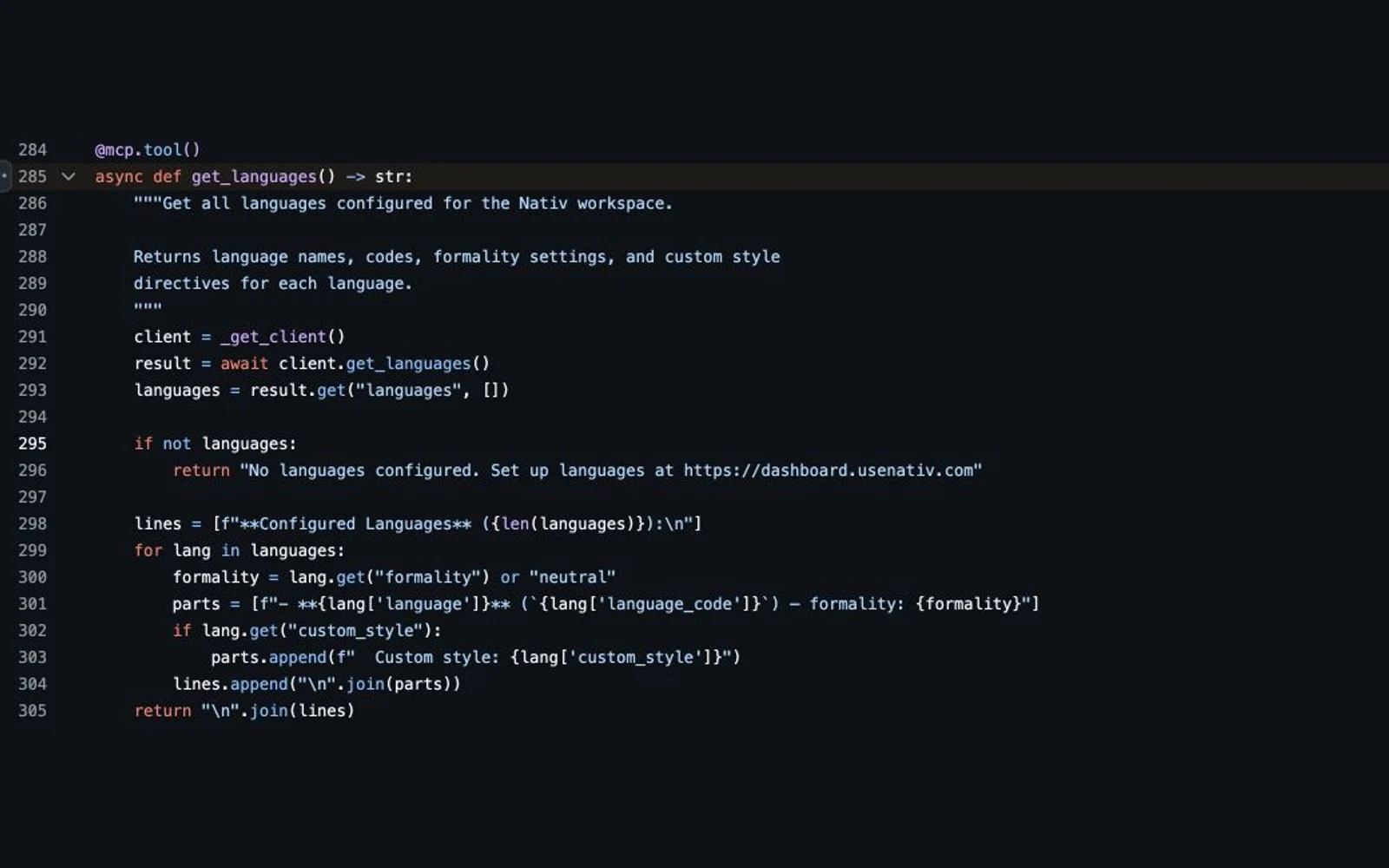
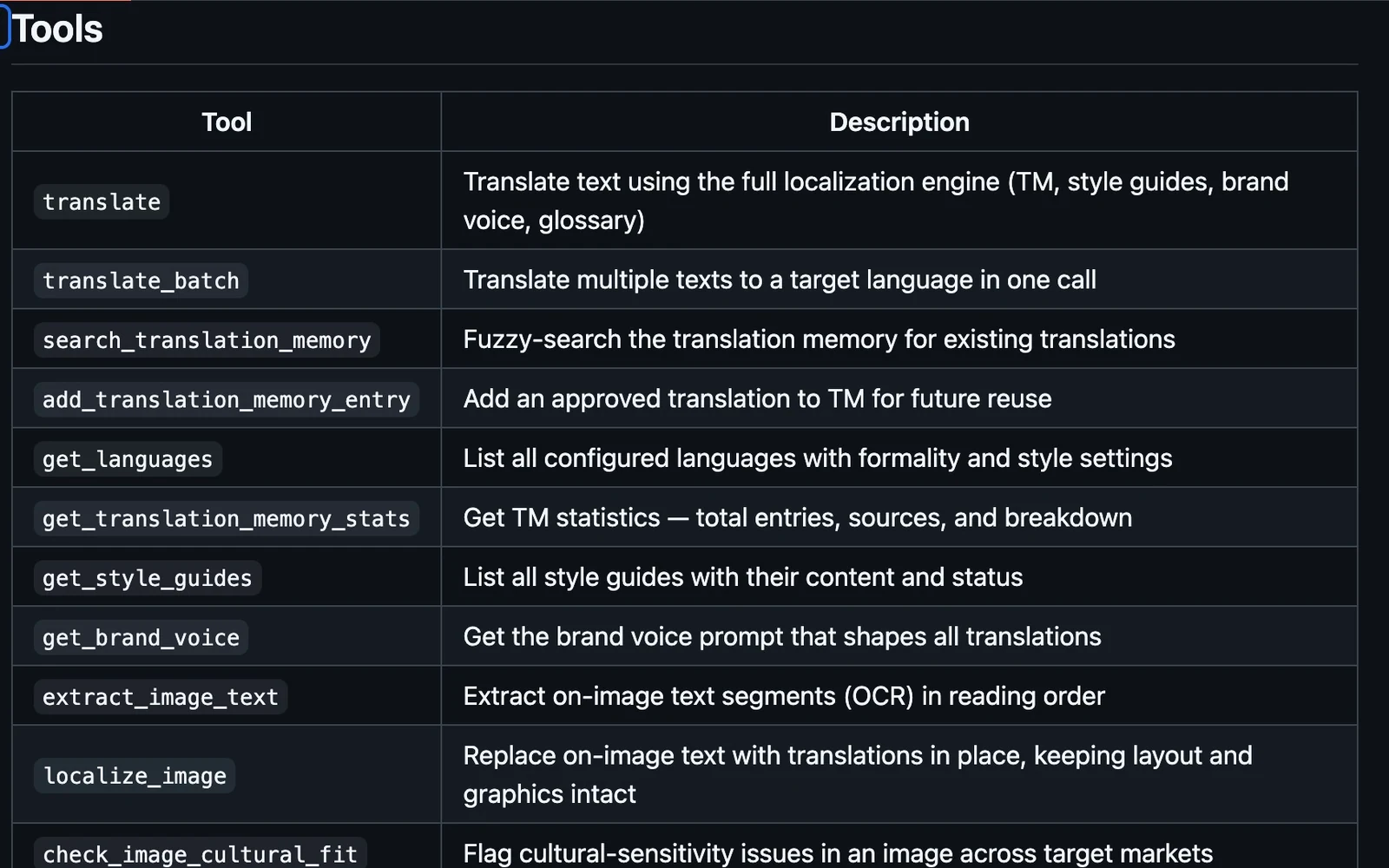
Investigate Nativ when the brief spans copy, images, speech or subtitles and should use your workspace’s brand context. Its public capability reference includes text translation, memory and style-guide operations, plus media and saved-subtitle review/export workflows.
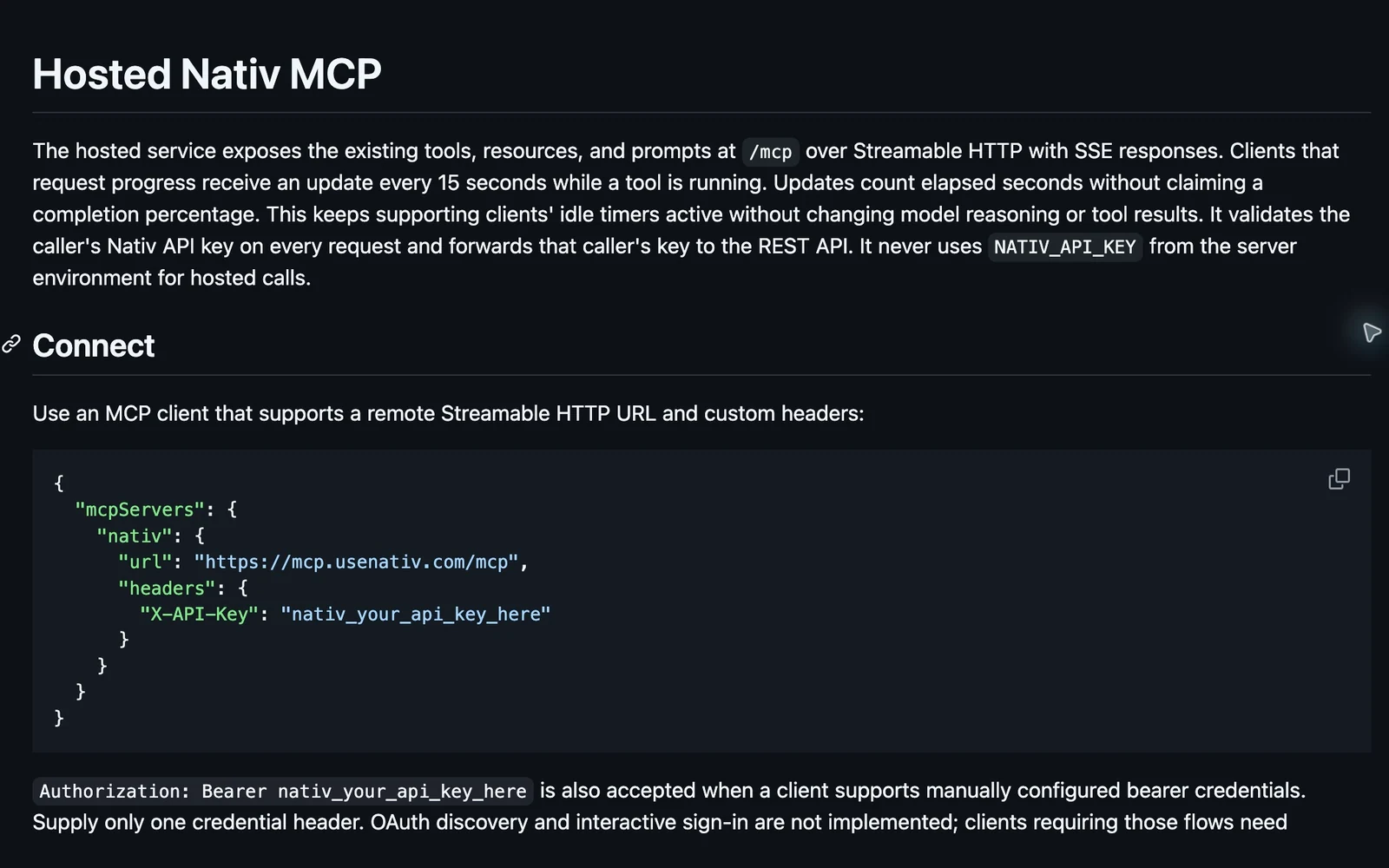
The hosted guide documents a remote endpoint with an API key. The full 51-tool connection uses API-key authentication. A separate focused OAuth endpoint exposes seven copy/image/context/memory tools; it is not a substitute for the full catalogue. See the connection distinctions. Hosted media uses HTTPS input URLs and expiring output links; the local transport can work with local paths.
Start with the read-only connection diagnostic before a generation request. It separates network reachability, authentication and a configured-workspace read. This operational preflight does not restrict the server itself to read-only access. Then use the MCP connection guide and capability reference. For an editable project inside a creative application, also consider the appropriate native plugin. A rendered video and an editable After Effects composition are different deliverables.
Crowdin: when the agent needs to operate the localisation project
Crowdin’s MCP documentation describes file and string workflows, translation status, memory, terminology, style guides and project operations. It documents hosted endpoints with OAuth or access-token authentication and recommends its V2 interface for new integrations.
This is a useful candidate when the existing source of truth is a Crowdin project. Evaluate the operations your team needs and the scopes those operations require. Do not assume that a connection intended to read status should also be allowed to change translations or project membership.
Lokalise: when project and developer tasks need different toolkits
Lokalise documents separate project-management and software-development toolkits. Examples include checking untranslated keys, managing tasks, handling terminology and working with screenshots for context.
At the time of this check, its guide labels the feature beta, identifies it with Lokalise Expert rather than Vantage, and ties access to API-enabled plans. Confirm eligibility for your account. Then test the specific toolkit and account permissions your workflow needs.
Phrase: when the work already lives in Phrase
Phrase’s current guide describes a remote service with regional endpoints. The assistant can perform documented routine work against a signed-in account, subject to the selected consent and the user’s existing role.
That makes account and region selection part of the evaluation. Inspect which read, create or modification permissions are needed for your task. Use the current remote documentation: the earlier local server is deprecated, so an old package-based tutorial is not a reliable setup reference.
Locize: when the team needs access to its translation projects
Locize’s current MCP documentation describes a hosted service with OAuth or scoped personal access tokens. Its tools cover more than project discovery: missing or stale keys, glossary and style-guide retrieval, translation-memory search, screenshot context, review proposals and publishing/branch operations.
For an existing application, a useful evaluation starts with list_projects, then reads the relevant keys and context before proposing updates. Check review state and AI-origin flags when writing generated wording; publishing is a separate operation. Project roles and token scopes both constrain access. That makes Locize a concrete candidate for maintaining a Locize/i18next workflow, rather than merely a place to fetch translations.
For creative work, distinguish screenshot context for a string from rendering translated lettering into an image. This documentation review does not establish that every media deliverable is available through that connection. Test the particular artifact your team needs.
SimpleLocalize: when local setup should connect to the translation API
SimpleLocalize’s official integration describes an open-source server run locally through a package command and connected to the product’s API. Documented areas include keys, automatic translation, import/export and translation hosting.
Evaluate the local runtime and credentials alongside the translation task. The server package and the account-backed service are separate considerations: an open-source server does not mean all underlying service usage is free.
Which server is best for your workflow?
If a team already owns its files, assignments and reviews in a TMS, begin by evaluating that system’s official MCP connection. Recreating project state in another tool can add work that a successful translation example does not reveal.
If the missing step is producing brand-aware creative deliverables across formats, evaluate Nativ against a representative campaign. Ask what the reviewer receives: a translated value, an updated project, an editable file or a rendered asset. Those outcomes should not be treated as interchangeable.
For a new stack, test the reviewer handoff before committing to a vendor. Glossaries, memory and AI features appear across the category. The important distinction is how the service applies them in your actual workflow and what remains for a person to inspect.
There is no documented basis here for saying that one of these six is best for every team. There is a useful basis for narrowing the shortlist by the work you need done.
Match a real task to its tools
Take the fictional Northstar campaign in the evaluation brief: a headline, a button label and a banner image. Decide which deliverable the reviewer needs before choosing a call.
- Keep an existing application catalogue current: inspect project keys, missing/stale translations and relevant context in the system that owns that catalogue. In Locize, the documented sequence includes
list_projects, context retrieval and review before key updates or publication. - Prepare Nativ copy proposals: read workspace languages and guidance, search relevant memory, then use
translateortranslate_batch. A batch shares context and formality; it does not expose the single-text tool’s inline-glossary argument. Preserve source identifiers and inspect every returned result. - Deliver a translated banner image: in Nativ, extract visible text with
extract_image_text, review the replacement pairs, then uselocalize_image. Inspect the actual downloaded image. Its lettering is raster output, not recovered editable type layers.
These are documentation-backed evaluation paths, not reported side-by-side test results. Both products expose context and review concepts; select the workflow and final artifact, then verify it with an owned example. The request examples and saved-subtitle handoff make those boundaries explicit for Nativ.
A small evaluation you can repeat
Use an owned demonstration project and the same brief for each eligible option. Download our sample evaluation brief as a starting point. It contains fictional content, not customer material or measured results.
- Name the destination. Choose a button, a campaign headline, a locale file or a subtitle file. Decide what a usable result looks like before generating it.
- Provide the approved context. Include terminology, audience and placement. If a server can retrieve existing context, inspect what it retrieves rather than assuming the agent used it.
- Check access first. Confirm the intended workspace and permissions with a read-only operation. Give write access only when the evaluation requires it.
- Generate a small proposal. Explicitly ask the agent to use the connected service and return a result for review. Keep generation separate from applying or publishing it.
- Inspect structure and language. Compare keys, tokens, cue boundaries or record identifiers as relevant. Check the wording with an appropriate reviewer; a structurally valid file can still contain a poor translation.
- Complete the handoff. Open the actual exported file or inspect the changed project. Record the steps, corrections, account requirements and usage involved.
A brief for an eligible Nativ text workflow might look like this:
Use the connected Nativ service for this demonstration.
Target locale: Spanish for Spain.
Placement: a short campaign card.
Keep the fictional product name Northstar unchanged.
Propose a headline and button label for review.
Do not apply changes or publish anything.
For media, check the final asset, not merely the transcript. For subtitles, inspect the regenerated export after review edits. For application strings, preserve the structure and run the framework’s validation. The GitHub Action guide and subtitle review guide show why the final handoff deserves its own check.
What to recheck before a 2027 rollout
Revisit the official setup guide, supported actions, account eligibility and billing unit. Check whether the client supports the server’s current transport and authentication. Repeat the representative task if the service or your input format changes.
Keep a short evaluation record with the date, product version or documentation source, task and observed output. Treat an undocumented capability as unverified rather than absent. Do not carry an old pricing claim or installation command into a new year’s buying decision unchecked.
If your next campaign needs shared brand context across text and media, verify a Nativ connection first, then start with one small, reviewable brief. If your immediate need is project administration in an established TMS, evaluate that system’s connection first. The right starting point is the one that removes a real handoff from your work.
Product references
How to test a localization MCP connection before translating
Connect Nativ MCP to Cursor, keep the API key out of shared configuration, check authentication and run a read-only first task before generating content.
An AI agent needs more than a translate button.
Nativ MCP 0.5.0 connects AI agents to 51 localisation tools across text, images, audio, subtitles and shared brand context.