How to translate outlined text in an Illustrator file
The box artwork opens perfectly. Its words are hundreds of anchor points. Before translating, recover the text and decide which parts of the design should remain artwork.
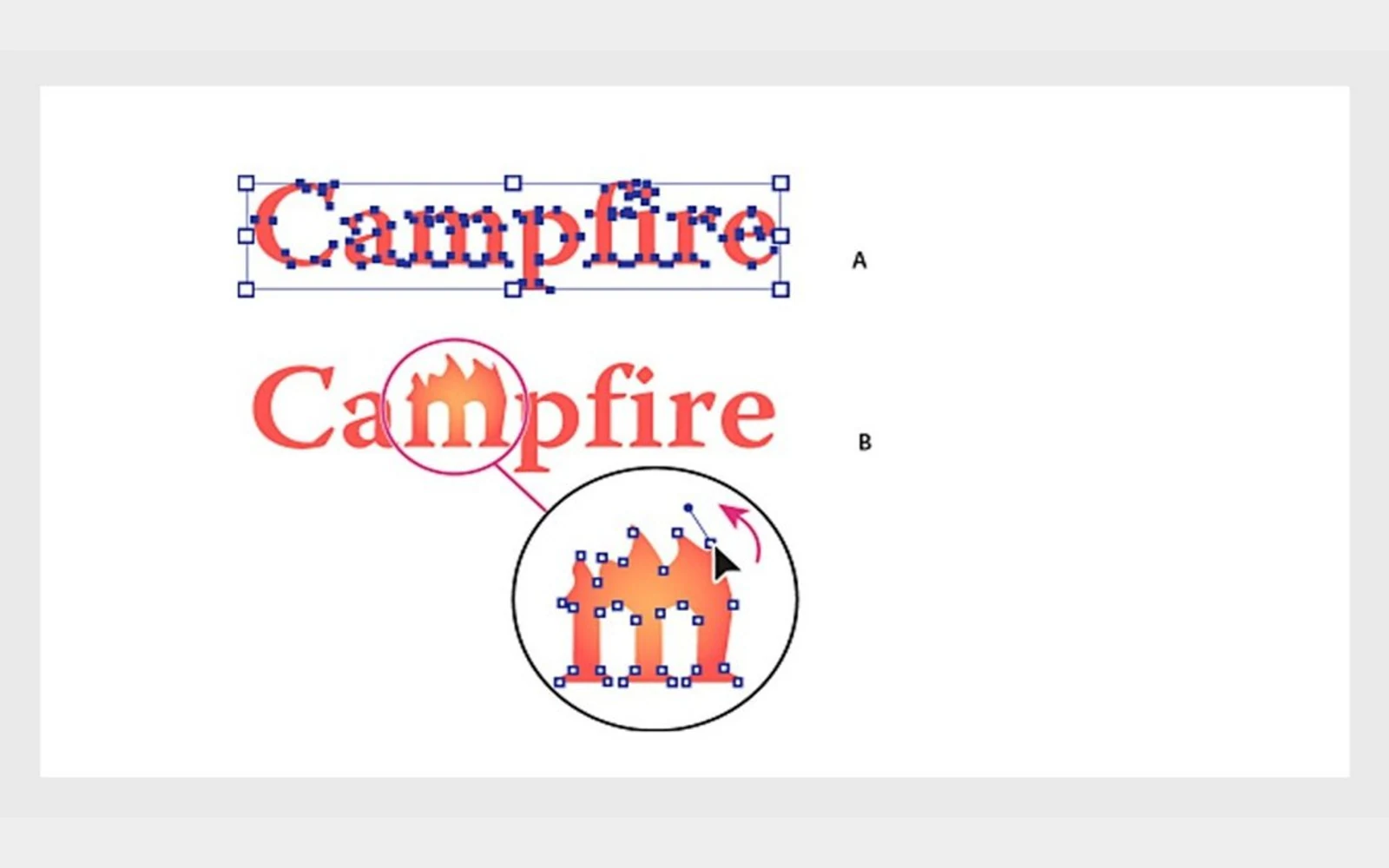
Recover or reconstruct the source words first, translate the approved copy, then rebuild and review the type in the design. Outlined letters are vector artwork. They are not ordinary text objects that a translation workflow can simply replace.
A designer given box artwork with only outlines asked whether changing its information was possible. Replies recommended asking for the right source file, identifying the font and retyping when necessary. One suggested an Acrobat workaround but explicitly said it was untested. That discussion identifies a real handoff problem; it does not establish a reliable conversion recipe.
Written by Nativ; checked on 16 November 2026. We reviewed current Adobe documentation and Nativ’s released text translation interface. We did not recover a customer file, run native Illustrator conversion or generate paid translations. The artwork above is Adobe’s published documentation example.
Check whether the words are still type
Work on a copy of the supplied artwork. Inspect the object you need to change with Illustrator’s type and selection controls. Can you place a text insertion point and edit the characters, or are you selecting paths and anchor points? Distinguish a locked object from a different object type before deciding that copy has disappeared.
Adobe documents that Type > Create Outlines converts type into vector shapes and removes ordinary text and font editing. Its guidance recommends duplicating type before conversion if an editable version is needed. “Editable vector” therefore describes a different capability from “editable text”.
A file can mix live text, outlined headings and placed images. Record the state of each required copy area rather than assigning one label to the entire document. A successful translation of a live paragraph does not prove that an outlined product name was covered.
Ask for the editable source before rebuilding
Request the version containing live type, its approved copy and the fonts or font information needed to work with it. Check whether a supplied package, earlier revision or separate language master already contains those elements. Preserve the original delivery while investigating.
If the editable original cannot be obtained, agree on a reconstruction task. A font match, OCR result or conversion feature can provide a starting point, but verify the exact words, punctuation and styling against the approved source. Do not treat recognition as recovery of every original design decision.
Current tools change. Check the actual Illustrator version and current documentation before relying on an old tutorial or forum answer about Retype. This guide does not claim that every conversion tool is unavailable, or that any one of them can recover your artwork perfectly.
Make a copy inventory that survives translation
For a fictional Studio carton, separate three items: the Studio wordmark, a benefit heading and an instruction paragraph. The wordmark may remain approved artwork, while the heading and instructions need language versions. Record that decision explicitly.
Give each translatable item a stable label, approved source wording, artboard reference and reviewer. Add the space or hierarchy constraint in plain language: “front panel heading, two lines available” is more useful context than a bare list of fragments.
If a number, unit or product identifier appears inside the design, include it in the review inventory even when it should remain unchanged. This is a coverage decision, not permission to rewrite regulated or approved claims. Have the responsible owner approve any substantive copy change.
Choose a translation route for the recovered copy
Adobe currently documents a built-in route for selected text boxes: Type > Rewrite, then Translate, choose a supported target language, generate and review a variation. Its documentation notes that translated text uses the target language’s default font. This is a useful native option for live type, not evidence that a selected path has become a text box. We reviewed the documentation rather than testing this workflow.
For a shared copy workflow, Nativ’s released translate_batch MCP tool accepts related strings for one target language and a context field. Send the approved heading and instructions with their purpose and terminology guidance. Keep the inventory-to-result mapping in your own handoff and review every result before placing it.
Nativ’s text response does not itself reconstruct an Illustrator text object, identify the original font or repair custom letterforms. Use the glossary workflow for agreed terms and the translation review guide for the language approval step.
Rebuild the language version and inspect the export
Place approved copy into live type on a separate language artboard or working copy. Choose fonts that support the target script and retain an editable master. Review wrapping, spacing, alignment, hierarchy and the relationship between text and surrounding artwork.
Inspect the final exported deliverable as well as the working file. Check that no old outlined wording remains underneath, beside or inside a placed asset. Compare each inventory item with the intended language version and record any deliberately unchanged brand artwork.
If a production recipient requires outlines, make that a separate final output step after approval. Keep the live-type source, approved copy and final export tied to the same revision. The next correction should begin with words you can edit, rather than another search through letter-shaped paths.
Product references
How to translate a JPG or PNG without the original design file
Translate text baked into an image: choose the right workflow, review OCR and wording, render a new image, and check what changed before publishing.
How to create a translation glossary, with a CSV template
Build a useful translation glossary from existing copy, define term meanings and locale rules, then test it in Nativ’s dashboard or MCP workflow.